Modular .bashrc with .bashrc.d/
2026-02-11 · #bash #dotfiles #stow #shell
The .bashrc.d pattern isn't new. Source a directory of files instead of one massive .bashrc. You've probably seen it before.
I'm not here to share my dotfiles for you to clone. Most dotfiles repos are opinionated, large and hard to untangle. Instead, I want to explain the pattern so you can build your own.
What makes .bashrc.d powerful for me is combining it with GNU Stow. When your shell config is a directory, different Stow packages can each contribute their own files. They all merge into one place. Your nvim package brings its editor settings. Your fzf package brings its keybindings. Everything stays organised by tool, not scattered through one monolithic file.
But first, the pattern itself.
The pattern
Instead of one massive .bashrc, you source a directory of small focused files:
# At the end of .bashrc
if [ -d "$HOME/.bashrc.d" ]; then
    for config in "$HOME/.bashrc.d"/*.sh; do
        [ -r "$config" ] && source "$config"
    done
fi
That's it. Five lines. Your .bashrc stays minimal and your actual configuration lives in .bashrc.d/ as separate files.
If you've used oh-my-zsh, this might look familiar. The custom directory does something similar. The difference is that .bashrc.d sits in your home directory where any dotfile manager can reach it (Stow, chezmoi, dotbot, yadm) and it works with any shell, not just zsh.
Naming convention
I use numbered prefixes to control load order:
~/.bashrc.d/
├── 10-clipboard.sh
├── 20-fzf.sh
├── 21-zoxide.sh
├── 22-exa.sh
├── 23-bat.sh
├── 24-completions.sh
├── 25-nvim.sh
├── 26-ssh-completion.sh
├── 30-project-workflow.sh
├── 31-tmux-help.sh
├── 35-terminal-title.sh
├── 40-nvm.sh
├── 50-env-tools.sh
├── 60-api-keys.sh
├── 70-powershell.sh
├── 80-fabric.sh
├── 90-bitwarden.sh
└── ...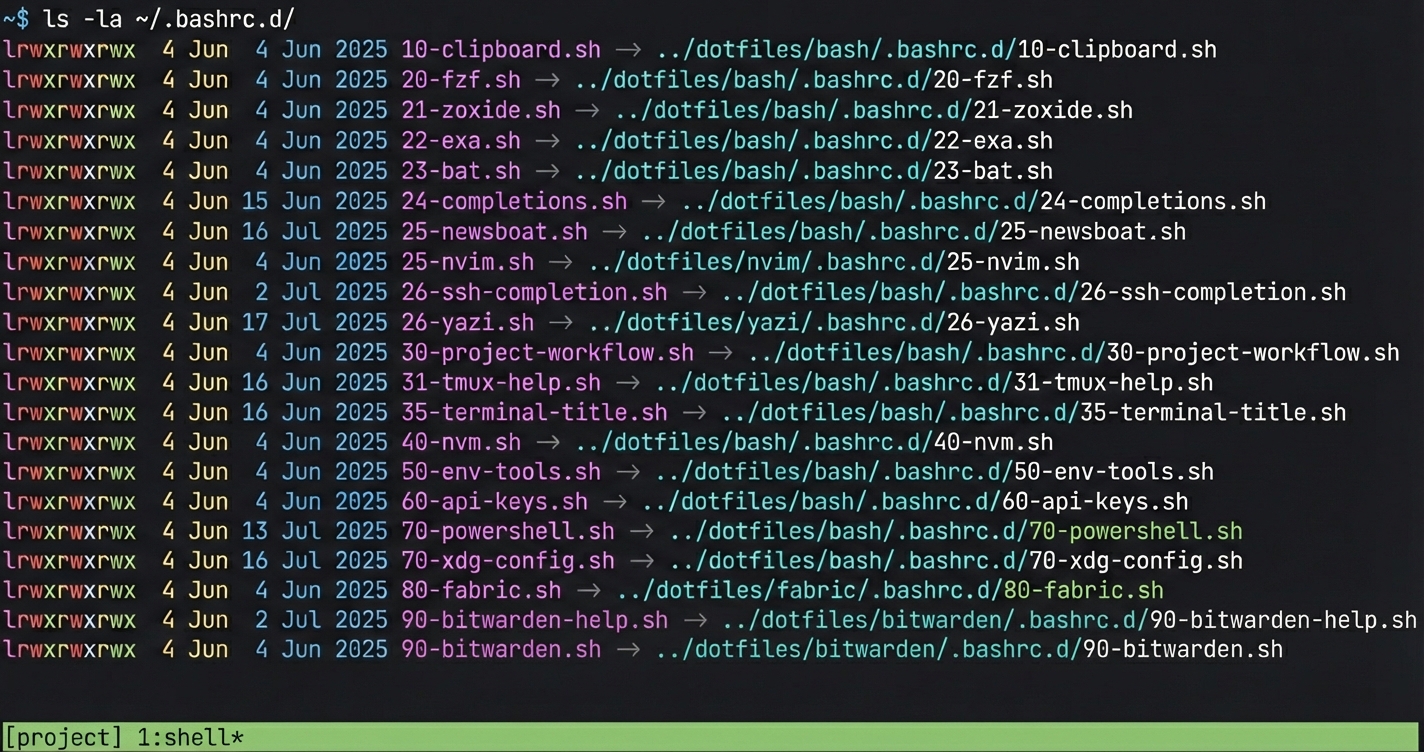
Lower numbers load first. This matters when scripts depend on each other. fzf at 20 loads before anything that uses it.
The gaps between numbers give you room to insert new files without renumbering everything. I use 10s for core utilities, 20s for CLI tools, 30s for workflow functions, 40+ for language runtimes and integrations.
This relies on glob expansion sorting alphabetically, which is the default in bash (controlled by LC_COLLATE). If you've set GLOBSORT to something else, the numbered prefix won't load in order.
You'll notice 60-api-keys.sh in there. That file sources tokens from a separate location outside the dotfiles repo. Don't put actual secrets in .bashrc.d/ if you're committing your dotfiles to git, right?
What goes in each file
Each file handles one tool. Check if the tool exists before configuring it. Keep it short.
# 22-exa.sh - modern ls replacement (eza works too)

if command -v eza &> /dev/null; then
    alias ls='eza'
    alias l='eza -la --icons'
    alias t='eza --tree --icons'
elif command -v exa &> /dev/null; then
    alias ls='exa'
    alias l='exa -la --icons'
    alias t='exa --tree --icons'
fi
# 25-nvim.sh - editor configuration
if command -v nvim &> /dev/null; then
export EDITOR=nvim
export VISUAL=nvim
alias vi='nvim'
alias vim='nvim'
fiSame pattern. Check availability, set variables, create aliases. If the tool isn't installed, the file does nothing without errors. No shebangs either, as these files get sourced, not executed directly.
The real power: Stow package merging
Why do I use this pattern? Because with GNU Stow, each package can contribute its own .bashrc.d/ file. Stow merges them all into ~/.bashrc.d/ automatically.
My nvim package has this structure:
~/dotfiles/nvim/
├── .bashrc.d/
│   └── 25-nvim.sh
└── .config/
    └── nvim/
        └── init.lua
When I run stow nvim from ~/dotfiles, both the editor config and the shell integration get symlinked into ~. The nvim settings live with the nvim package. No more scattering across one big file. stow -D nvim removes both.
This is the key. Right now I have 5 different Stow packages all contributing files to the same .bashrc.d/ directory. The bash package handles core stuff. nvim, yazi, fabric and bitwarden each add their own shell integration. Stow merges them together. When I unstow a package, its shell config disappears too.
Without the .bashrc.d pattern, this wouldn't work. You can't have 5 packages all trying to manage ~/.bashrc. But a directory? Each package just adds its own file. As long as filenames are unique across packages, Stow handles the rest.
One thing to watch: if two packages try to create the same filename in .bashrc.d/, Stow will refuse. The numbered prefix convention helps here. Your nvim package owns the 25-* range, fabric owns 80-* and so on. Keep the numbering per-package and you won't hit conflicts.
Debugging
When something breaks, you know exactly where to look. Environment variable wrong? Check the relevant tool file. Alias not working? Find the file with that tool name.
Temporarily disabling a file is as simple as renaming it:
mv ~/.bashrc.d/40-nvm.sh ~/.bashrc.d/40-nvm.sh.disabledNew shell won't load nvm. Fix the issue, rename it back. No editing required.
The upgrade path
If you have an existing .bashrc, you don't need to migrate everything at once. Add the sourcing loop. Move things out piece by piece. Start with one tool, make sure it works, move the next.
Each file you extract makes the remaining .bashrc smaller and easier to read. After a few sessions you'll have a directory of focused configs instead of one tangled mess.
If you haven't read it yet, GNU Stow for dotfiles explains the package-based symlink approach that makes this pattern powerful. The .bashrc.d directory becomes the merge point for multiple Stow packages.
Starter gist: GitHub gist
Full dotfiles setup: github.com/simoninglis/dotfiles
Part of my series on building reproducible development environments. Next: .tmux-session files, letting each project own its terminal layout.